· Updated · 9 min read · Omkar Satpute and Milind Soni
Best self-hosted AI agents 2026: assistants, not frameworks
Ten self-hosted AI agents you can actually chat with, ranked on GUI, approval gates, model choice, and Windows support. Assistants only, no n8n or LangGraph.
The best self-hosted AI agents in 2026 are the ones you can talk to, not the ones you have to build. This list has ten of them, ranked on whether there is a GUI, whether the agent asks before it acts, which models it runs on, whether it controls your real computer or a sandbox, and whether it works on Windows and Linux. We make MausBot, so weigh this accordingly. It is first because it is the only one here that runs a team of the agents you already have, 16 engines including Claude Code, Codex, and Hermes, in one desktop app on Mac, Windows, and Linux. It does not tick every box: since October 2026 it starts at Full access, so it does not ask before it acts until you set a bot to Ask for approval. It is also the youngest project here, and OpenClaw and Hermes have far more stars.
Assistant or framework? Decide first
Many "best self-hosted AI agent" lists, including SSD Nodes', which puts Dify beside OpenClaw and Hermes, mix two different things. n8n, Dify, LangGraph, CrewAI, and AutoGen are frameworks: you build an agent out of them. The projects below are assistants: you install one, sign in, and start typing. If you want to ship an agent inside your own product, close this tab and go read about frameworks. If you want an agent that does your work while you do something else, keep reading.
How we ranked
Seven questions, each answered from the project's own docs or release notes, first on September 22, 2026 and again on November 15, 2026.
- Is there a GUI? A terminal is fine for developers. Everyone else needs a window.
- Does it ask before it acts, by default? Not "can be configured to ask". What happens the first time you run it.
- Which models, and can it use the subscription you already pay for? Claude Max, ChatGPT, and SuperGrok logins are worth more than another API bill.
- Does it control your real computer, or a sandbox? Both are valid. They fail differently.
- Windows and Linux? Mac-only is a real limit for half the people searching this.
- License. MIT and Apache 2.0 let you fork and ship. AGPL adds copyleft obligations, and "source available" licences vary. Read them before you fork.
- Activity. Recent releases and a maintainer who answers issues.
1. MausBot
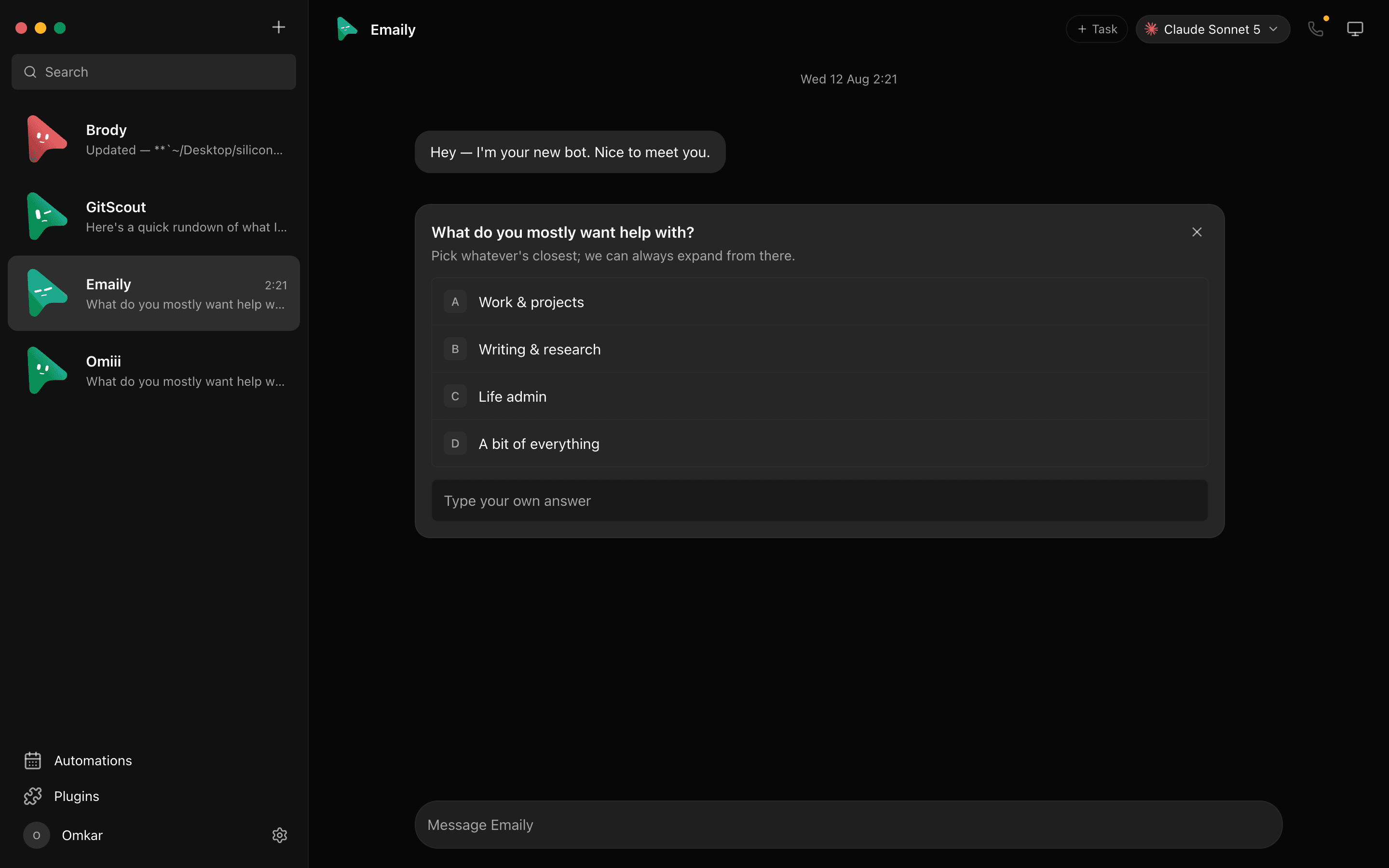
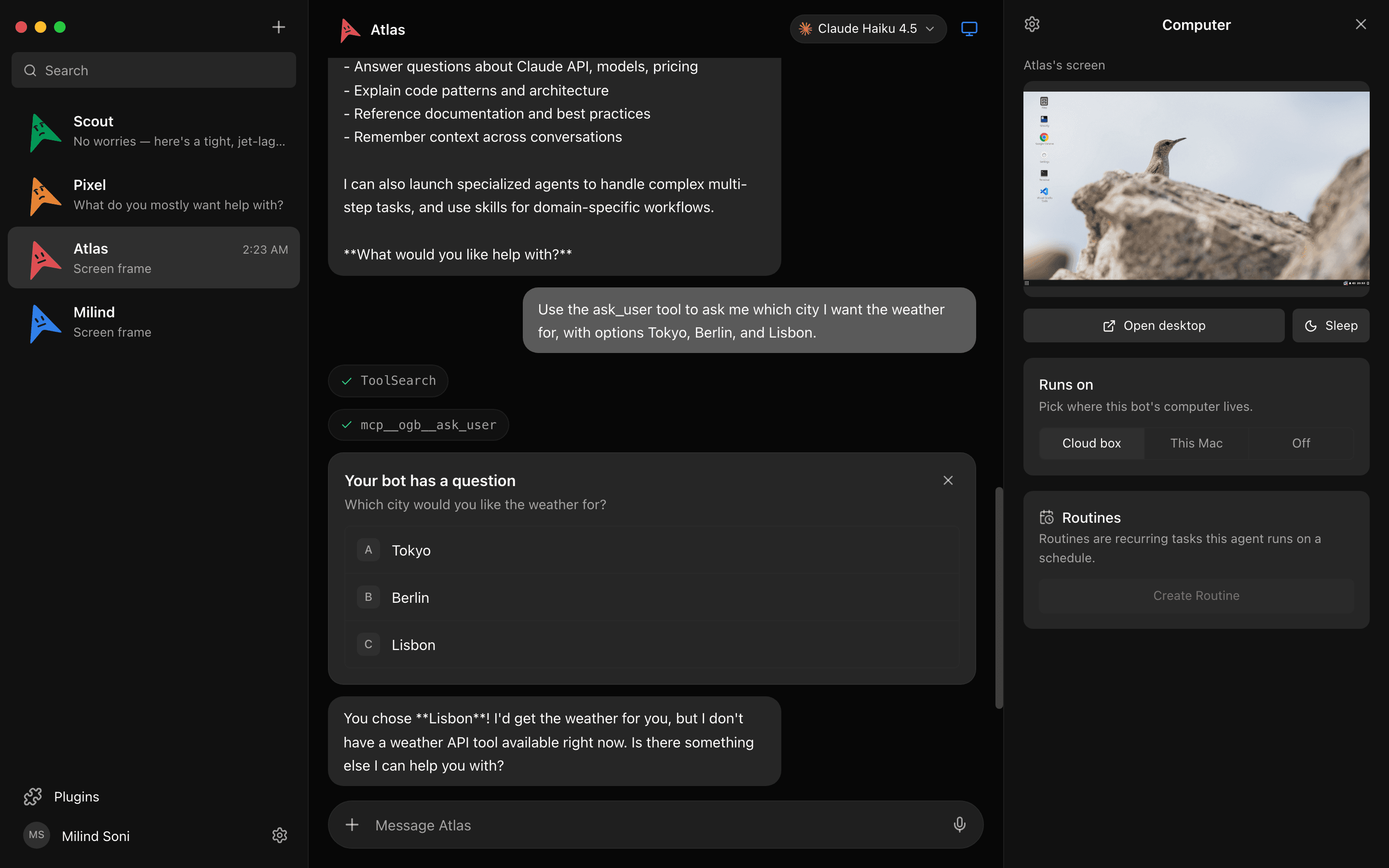
github.com/milind-soni/OpenMausBot, Apache 2.0, apart from an enterprise/ folder. Plainly: the youngest project on this list, with its first commit in August 2026. It is first because of the shape. MausBot is a Telegram-style chat app where every contact is a bot, and every bot has its own model, its own computer, its own connected apps, and its own memory. Bots run one of 16 agent engines, Claude Code, Codex, Grok, Cursor, GitHub Copilot, Kimi, Droid, Antigravity, OpenCode, Qwen, Hermes and more, on the plan or API key you already have, so there is no second bill, and MausBot installs and signs in Claude Code or Codex for you. API models and local models from Ollama, LM Studio, and others work too, and custom ACP agents such as OpenClaw can be added.
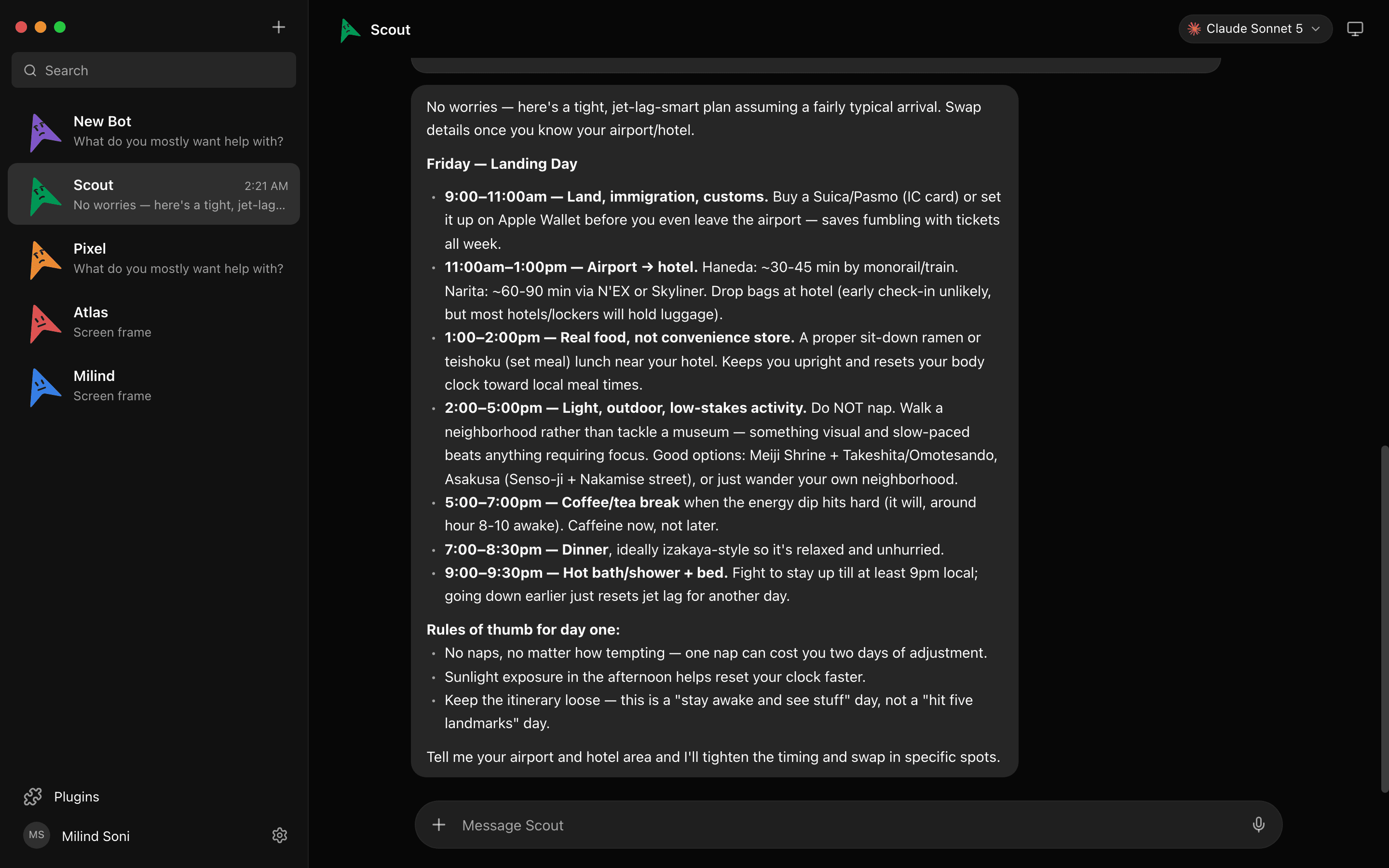
Every new bot starts at Full access. Switch a bot or a thread to Ask for approval, Auto-accept edits, or Approve for me, and set its sends on your behalf to Ask every time. Data lives in ~/.openmausbot on your own machine. Builds for macOS (Apple silicon and Intel), Windows x64, and Ubuntu; iPhone and Android apps on the App Store and Google Play. What it lacks: it does not ask before acting by default, the desktop app alone stops when the computer sleeps (a Cloud plan from $19 a month or a self-hosted server fixes that), the Windows installer is not code-signed yet, and bots do not live inside WhatsApp or iMessage.
2. OpenClaw
github.com/openclaw/openclaw, ~394k stars, MIT. The most-starred self-hosted agent by a wide margin. A gateway on port 18789 talks to 29 chat channels (WhatsApp, Telegram, Discord, Slack, Signal, and iMessage among them), runs skills from ClawHub, and speaks MCP. Models: Claude, OpenAI with a ChatGPT sign-in, DeepSeek, and Ollama for local. v2.0 (end of August) rebuilt the Control UI, tied approvals to each request, and added native apps with voice and Computer Use on paired Macs and explicitly enabled Windows machines. It now has desktop apps for macOS, Windows, and Linux, and it has moved to a 501(c)(3) foundation.
The honest part. Exec approvals exist (deny, allowlist, ask, auto, full), but the default on gateway hosts is full, with no prompt; MausBot also starts at Full access. 2026 brought CVE-2026-25253 (one-click RCE, more than 17.5k exposed instances by Hunt.io's count), the ClawHavoc campaign of 341 malicious ClawHub skills, and 312k+ hosts found on port 18789. The Register's take on v2.0 was that it is still "not bringing security by default". If you can operate it, nothing else has the reach.
3. Hermes Agent
github.com/NousResearch/hermes-agent, ~263k stars, MIT, Python. Launched February 25, 2026 and grew fast on the "$5 VPS" pitch: a single agent that creates its own skills from experience, keeps FTS5 session search for recall, runs cron jobs and subagents, and reaches you over 20+ chat gateways. Models via Nous Portal, OpenRouter, OpenAI, Anthropic, or a custom endpoint including local servers. Hermes Desktop, released as a public preview in June, runs on macOS, Windows, and Linux. By default a helper model judges risky commands, with DM pairing for chat gateways.
It is one agent per profile, not a team, though it is also one of MausBot's 16 engines. Native Windows is now fully supported, per its README.
4. ZeroClaw
ZeroClaw on GitHub, ~33k stars, MIT / Apache. A single Rust binary that connects to 30+ chat channels and runs tools in sandboxes. It is "supervised" by default, which is the right default and rarer than it should be. There is a web dashboard as well as the channels, with setup docs for macOS, Windows, Linux, and FreeBSD.
5. Goose
github.com/aaif-goose/goose, ~57k stars, Apache 2.0. Started at Block and now part of the Agentic AI Foundation at the Linux Foundation. Desktop app plus CLI, MCP-native, 15+ model providers. Goose starts in autonomous mode and has explicit approval modes, so you choose how much it asks. It leans toward developer work on the machine in front of you rather than a roster of always-on agents. A solid pick if you want one competent agent and a foundation behind it.
6. NanoClaw
NanoClaw on GitHub, ~31k stars, MIT. The idea is isolation instead of approval: every agent runs in its own Linux container on the Claude Agent SDK, and it relies on that isolation rather than approval prompts. That is a coherent design if the blast radius you care about is the container. macOS and Linux, Windows through WSL2. Claude by default, with Codex, OpenCode, Cursor, and local Ollama models as add-on providers.
7. OpenWork
github.com/different-ai/openwork, ~24.5k stars; the desktop app is MIT licensed, with a source-available ee/ folder. An Electron desktop app built on OpenCode that reads as a Claude Cowork clone: give it a folder, it plans and produces files. Mac, Windows, Linux. Models are whatever OpenCode supports. We could not find documented approval behaviour, so treat "asks first" as unknown until you try it.
8. Eigent
github.com/eigent-ai/eigent, ~16k stars, Apache 2.0. A multi-agent desktop built on CAMEL-AI, Node plus Python. It ships installers for macOS, Windows, and Linux, and runs local models through vLLM, Ollama, and LM Studio. Its README does not say how it asks before acting.
9. Vellum Assistant
Vellum Assistant on GitHub, ~1.5k stars, MIT. A desktop assistant for Mac, with a Windows dev build, and an interesting permission model: tools run in a sandbox that denies by default, and every actor is resolved as guardian, trusted, or unknown. In November 2026 Vellum shut down its hosted platform and said it will no longer actively maintain the repo; self-hosted copies keep working. Hard to recommend starting on it now.
10. Open Interpreter
github.com/openinterpreter/openinterpreter, ~69k stars. One of the first "let the model run code on my machine" projects, now rewritten in Rust as a coding agent based on Codex, with approvals and a sandbox. A terminal app, with a separate Workstation client. It is on this list for history and for people who live in a terminal; it is not a personal assistant in the sense the others are.
Side by side
Stars rounded on November 15, 2026, read from each project's GitHub page.
| Project | Stars | License | GUI | Asks before acting by default | Models | Win + Linux |
|---|---|---|---|---|---|---|
| MausBot | See GitHub; first commit Aug 2026 | Apache 2.0, apart from an enterprise/ folder | Desktop app (chat); iPhone and Android apps | No. Full access by default; Ask for approval per bot or thread | 16 agent engines (Claude Code, Codex, Grok, Cursor, Hermes and more), API and local models | Yes, Windows and Ubuntu |
| OpenClaw | ~394k | MIT | Native desktop and phone apps, browser Control UI, CLI | No. Ask mode exists; default is full on gateway hosts | Anthropic, OpenAI incl. ChatGPT sign-in, Google, xAI, DeepSeek, Ollama and more | Yes |
| Hermes Agent | ~263k | MIT | Hermes Desktop and CLI | Yes, smart: a helper model judges risky commands | Nous Portal, OpenRouter, OpenAI, Anthropic, local servers | Yes; native Windows fully supported, WSL2 too |
| ZeroClaw | ~33k | MIT or Apache 2.0 | Single binary, web dashboard, 30+ chat channels | Yes, supervised by default | Anthropic, OpenAI, Ollama, ~20 more | Yes; FreeBSD docs and embedded boards too |
| Goose | ~57k | Apache 2.0 | Desktop app and CLI | No. Autonomous by default; approval modes available | 15+ providers incl. Ollama, MCP-native | Yes |
| NanoClaw | ~31k | MIT | Chat only | No; relies on container isolation | Claude by default via the Claude Agent SDK; Codex, OpenCode, Cursor, Ollama as add-ons | Linux yes; Windows via WSL2 |
| OpenWork | ~24.5k | MIT desktop app; source-available ee/ folder | Electron desktop app | Undocumented | Whatever OpenCode supports | Yes |
| Eigent | ~16k | Apache 2.0 | Multi-agent desktop app | Not stated in its README | vLLM, Ollama, LM Studio, and others | Yes |
| Vellum Assistant | ~1.5k; no longer maintained | MIT | Desktop app | Sandboxed tools, deny by default; asks until you mark a task trusted | Anthropic, OpenAI, Gemini, Ollama | Windows dev build only; no Linux desktop |
| Open Interpreter | ~69k | Apache 2.0 | Terminal app; a separate Workstation client | Approvals and a sandbox; --yolo bypasses both | Kimi, DeepSeek, GLM, any OpenAI-compatible provider | Yes |
Pick by use case
- You already pay for Claude, ChatGPT, or SuperGrok and want a team of agents with a GUI: MausBot. Each bot on its own engine and login, with approvals you set per bot.
- You want an agent you can message from WhatsApp or Telegram all day and you are comfortable running a daemon: OpenClaw, with exec approvals switched from full to ask before you expose it. Hermes if you would rather have one self-improving agent on a VPS.
- You want one capable developer agent with a foundation behind it: Goose.
- You want Claude Cowork without Anthropic's cloud: OpenWork or Eigent, and test the approval behaviour yourself.
- You want isolation over prompts: NanoClaw, and keep anything valuable out of the container.
Frequently asked questions
- What is the difference between a self-hosted AI agent and a framework?
- An agent is something you talk to: you type a message, it does the task, it comes back with the result. A framework is something you build with: n8n, Dify, LangGraph, CrewAI, and AutoGen give you nodes or classes to wire your own agent together. Every project on this list is the first kind. If you are a developer who wants to ship an agent inside a product, look at the second kind instead.
- Which self-hosted AI agent is the safest?
- The ones that ask before they act and keep data on your disk. Out of the box, Hermes (a smart check by a helper model) and ZeroClaw (supervised) put a gate in front of risky commands. OpenClaw, Goose, and MausBot ship with it off by default (full, autonomous, and Full access) and have ask modes you turn on; in MausBot that is per bot or per thread. NanoClaw takes a different route and isolates each agent in a container instead of asking. No project on this list has solved prompt injection; a gate limits what a bad instruction can do, it does not stop the instruction arriving.
- Can I run these with a local model?
- Most of them. OpenClaw lists Ollama, and Hermes works with local servers. Goose supports 15+ providers. MausBot detects Ollama, LM Studio, oMLX, EXO, and Unsloth hosts and offers them in each bot's model picker. NanoClaw is Claude by default and adds local Ollama models as an add-on provider. Expect a local model to be slower and to need more approvals corrected by hand.
- Do I need a VPS?
- No. Every desktop-app project here (MausBot, OpenClaw's desktop apps, Goose, OpenWork, Eigent, Hermes Desktop) runs on the laptop in front of you. A VPS helps when you want the agent reachable from chat apps all day, which is the OpenClaw and Hermes way of working; Hermes markets itself around a $5 VPS. MausBot can be self-hosted free on your own Ubuntu server with a one-command installer, or run on a Cloud plan from $19 a month, if you want your bots always on later.
- Which self-hosted agent works on Windows?
- MausBot ships a Windows x64 build, not yet code-signed. OpenClaw has a native Windows app for x64 and ARM64. Hermes supports native Windows fully, and WSL2. OpenWork, Eigent, ZeroClaw, and Goose ship Windows builds; Vellum Assistant's Windows app is a dev build. NanoClaw needs WSL2. For the rest, check the releases page before you commit.
Get started with MausBot
Download for macOS, Windows, or Ubuntu, let MausBot install and sign in Claude Code or Codex, and make your first bot. The app is free; you pay your model providers what you pay them now. If you are choosing between this and a hosted product, we compared Grok Bot and Meta Muse line by line. Source on GitHub.
This post is based on the products as they were on . Products change. If something here is out of date, tell us and we will correct it.