· Updated · 9 min read · Omkar Satpute and Milind Soni
OpenClaw alternative: a team of your AI agents in one app
An OpenClaw alternative: a desktop app for Mac, Windows and Ubuntu that runs Claude Code, Codex and 14 more agent engines, with approvals set per bot.
MausBot is an OpenClaw alternative with approval levels built in, set per bot. OpenClaw is an assistant you run on your own machine and reach over WhatsApp, Telegram, or its own apps; out of the box it runs shell commands without asking. Since October 2026, so does MausBot: every new bot starts at Full access, and you switch a bot to Ask for approval when you want it to check first. The difference is the shape. MausBot is a desktop chat app that runs a team of the agents you already have, Claude Code, Codex, Grok and 13 more engines, each bot on its own model. It is free, Apache 2.0 licensed, and works on the Claude, ChatGPT, or Grok plan you already have.
What OpenClaw is
OpenClaw is the most-starred self-hosted AI agent on GitHub, at roughly 394,000 stars. It started as Clawdbot in November 2025, became Moltbot on January 27, 2026, and took its current name three days later. It is the project that proved people want an agent that lives in their chat apps and does things on their machines.
- A gateway on port 18789 connects to 29 channels, WhatsApp, Telegram, Discord, Slack, Signal, and iMessage among them.
- Skills come from ClawHub, tools come over MCP, and models include Claude, OpenAI with a ChatGPT sign-in, DeepSeek, and local models through Ollama.
- MIT licensed and written in TypeScript. It installs from native desktop apps for macOS, Windows, and Linux, a script that sets up Node for you, or npm on Node 24.16 or newer, and has iOS and Android apps.
- v2.0 shipped at the end of August 2026 with a rebuilt Control UI, approvals tied to each request, memory recall, a Skill Workshop, native apps with voice, and Computer Use on paired Macs and explicitly enabled Windows machines.
The creator, Peter Steinberger, joined OpenAI in February 2026, and the project now sits under the OpenClaw Foundation, an independent 501(c)(3) whose README says OpenAI is a donor, not an owner. It is not going anywhere. If you are comfortable at a terminal and you run it well, it is a lot of agent for free.
Why people look for an OpenClaw alternative
Four reasons, in the order they come up.
1. The security history
OpenClaw's 2026 security record is long.
- February 2026. Koi Security reported ClawHavoc: 341 malicious skills on ClawHub, 335 of them installing the Atomic Stealer macOS credential stealer.
- February 9 and 18, 2026. SecurityScorecard counted more than 135,000 OpenClaw instances exposed to the internet, and a scan by Flare found more than 312,000 hosts answering on port 18789. OpenClaw's docs now say a regular host install binds the gateway to loopback, while container images default to an exposed bind.
- CVE-2026-25253. A CVSS 8.8 one-click remote code execution bug, fixed on January 30, 2026, with more than 17,500 exposed instances counted by Hunt.io. CVE-2026-32922, a privilege escalation fixed in March, followed.
- Defaults. OpenClaw has an exec approval system with deny, allowlist, ask, auto, and full modes. The default on gateway hosts is
full, which means no prompt. MausBot also starts at Full access, so on its own this is a reason to change a setting, not to switch. After v2.0, The Register wrote that the release was "not bringing security by default": secrets are unencrypted at rest and the sandbox is not enabled automatically.
2. Setup and operations
OpenClaw 2.0 brought native desktop apps and an installer that sets up Node for you, so the first run is far easier than it was. Keeping it on around the clock is still your job: the project has no hosted option, so always-on means a server you run, reached over Tailscale or SSH.
3. Token cost
The heartbeat runs every 30 minutes by default, and Notebookcheck reported one user paying $18.75 overnight for it. Any always-on agent that polls spends tokens, MausBot automations included, so check the schedule before you leave it running.
4. It is built for operators
OpenClaw's docs expect you to choose a gateway bind, an auth mode, and an exec mode yourself. That suits operators, and it is the reason a lot of people search for something else.
What to look for in an OpenClaw alternative
- A real GUI. Something you install and open.
- Approvals you can set per agent. Decide which agents may act on their own and which must ask, and check what the default is before the first run.
- OAuth, not passwords. An agent that connects to apps through scoped sign-ins is a smaller blast radius than one that holds your logins.
- Local first. Transcripts and keys on your own machine, and nothing exposed to the internet by accident.
- Your existing subscriptions. If you already pay for Claude or ChatGPT, the agent should use that login rather than a new API bill.
MausBot: a team of the agents you already have
MausBot is a chat app, Telegram in shape, where every contact is an AI bot with its own model, computer, and connected apps. Each bot runs one of 16 agent engines, Claude Code, Codex, Grok, Hermes and more, or an API or local model, on the plan or API key you already have. OpenClaw itself can be added as a custom ACP agent. What the bots produce lives in ~/.openmausbot on your own machine. The code is on GitHub under Apache 2.0, apart from an enterprise/ folder.
Approvals, set per bot
When we first wrote this post, MausBot asked before every command by default. Since October 2026 every new bot and conversation starts at Full access: the engine runs in its most permissive mode, and real questions and missing sign-ins still reach you in the chat. That is the same starting point as OpenClaw's full default. What MausBot adds is the switch per bot or per thread: Ask for approval, Auto-accept edits, or Approve for me. Separately, each bot has a Sending on your behalf setting for email, messages, posts, and payments that you can set to Ask every time, and a bot asks first whenever you tell it to.
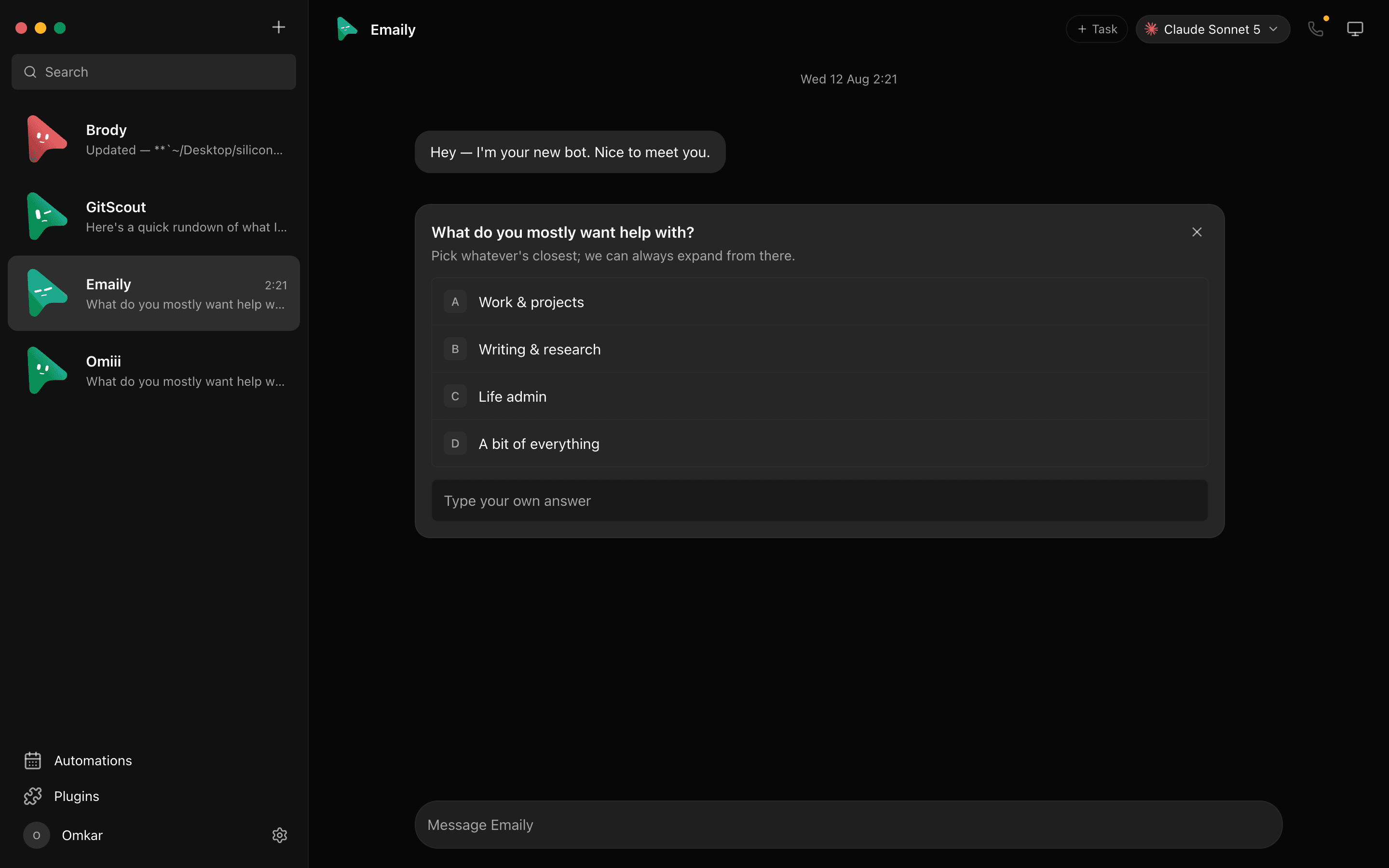
An app, not a gateway
Download, let MausBot install and sign in Claude Code or Codex, and meet your first bot. Bots share group chats, and one bot can be your Chief of Staff and hand work to its teammates.
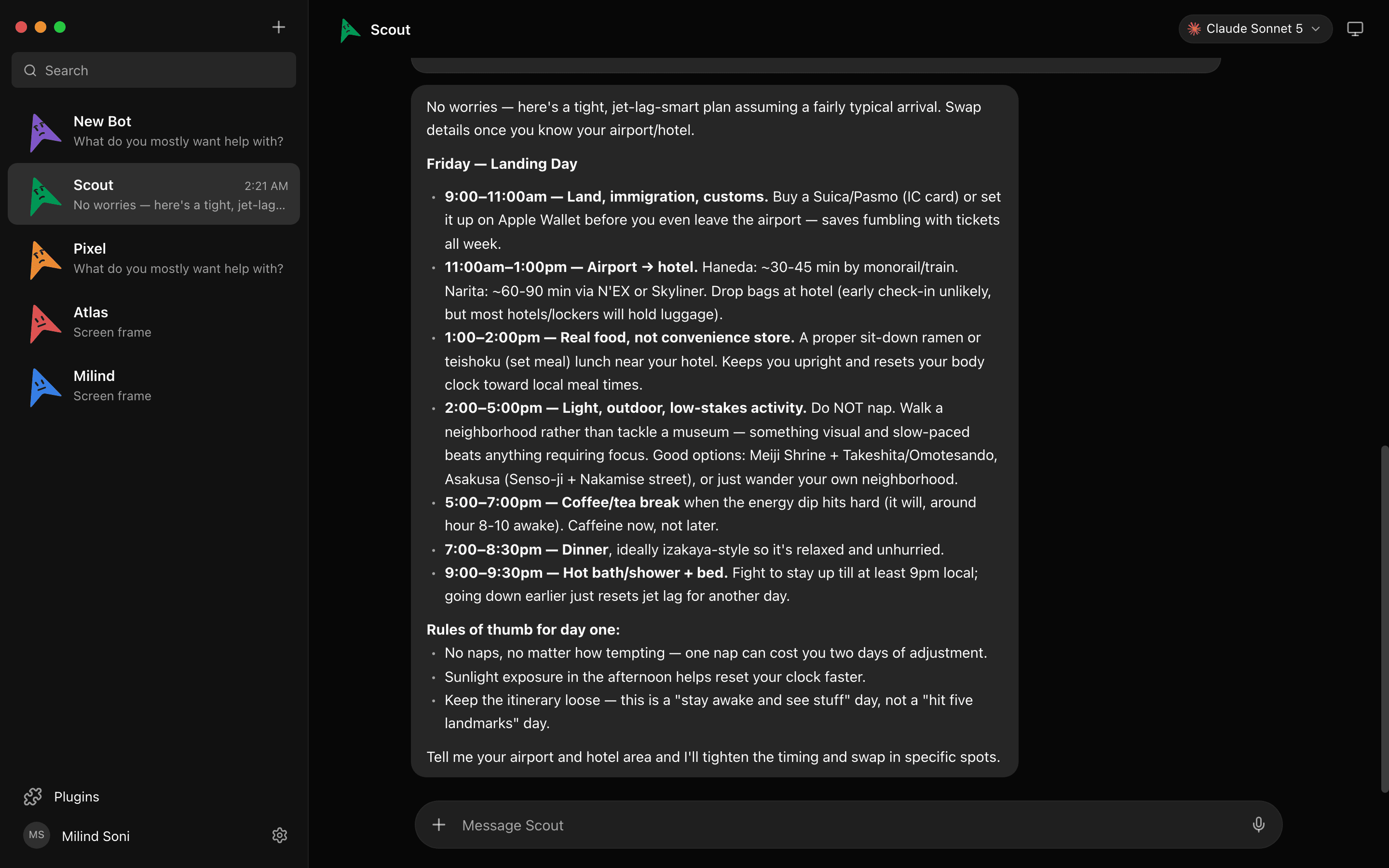
OAuth once, no passwords
Gmail, Slack, GitHub, Notion, Outlook, LinkedIn, and hundreds more apps connect through a managed Composio service. You sign in once, with no API key to paste. Any MCP server works too, and you can add one from the chat.
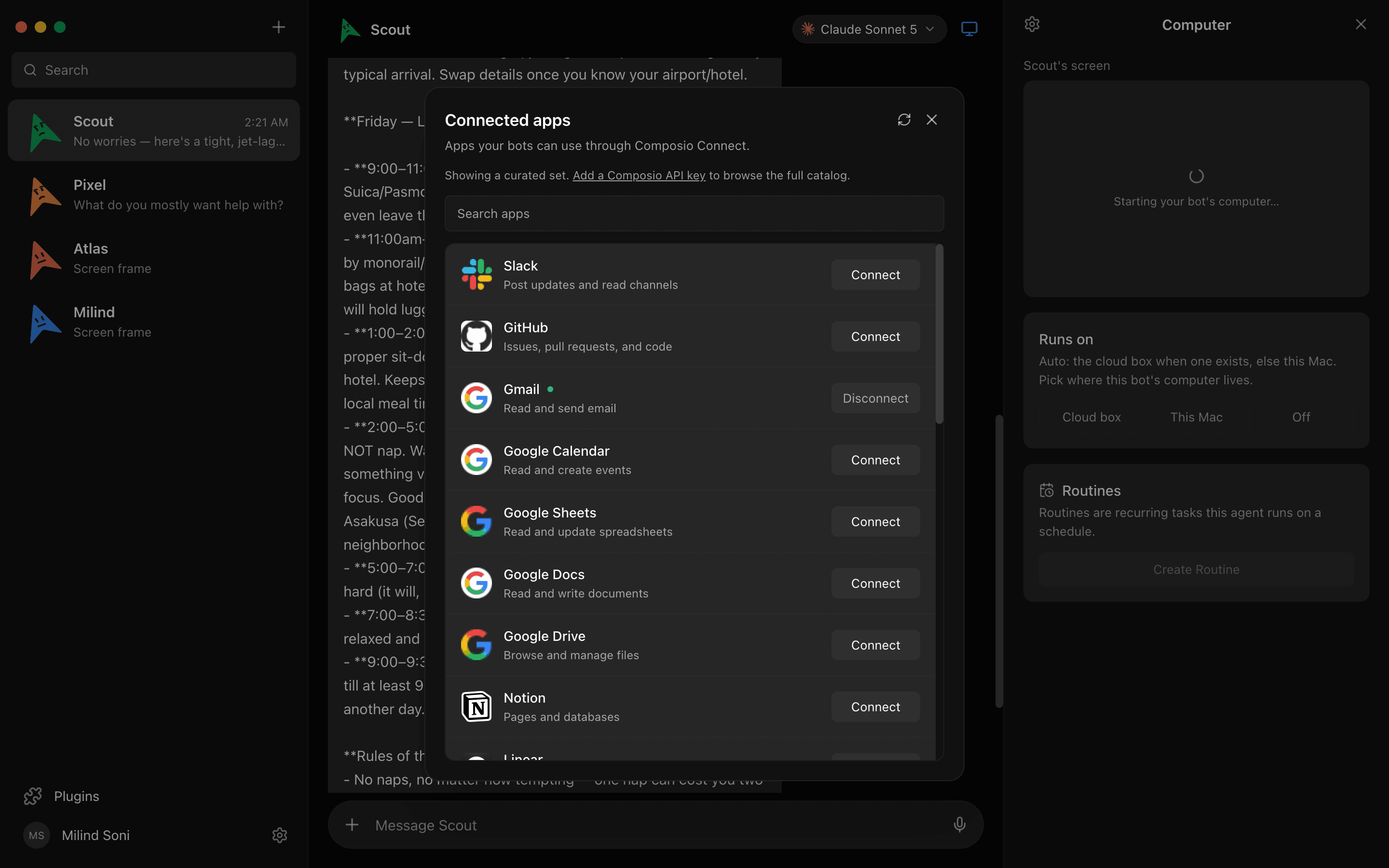
Your subscriptions, a model per bot
Claude Code, Codex, and Grok sit beside 13 more agent engines, Cursor, GitHub Copilot, Kimi, Droid, Antigravity, OpenCode, Qwen, and Hermes among them. API models from Mistral, Groq, DeepSeek, OpenRouter, and others work too, and local models from Ollama or LM Studio show up in each bot's model picker. Pick a model per bot and switch mid-conversation.
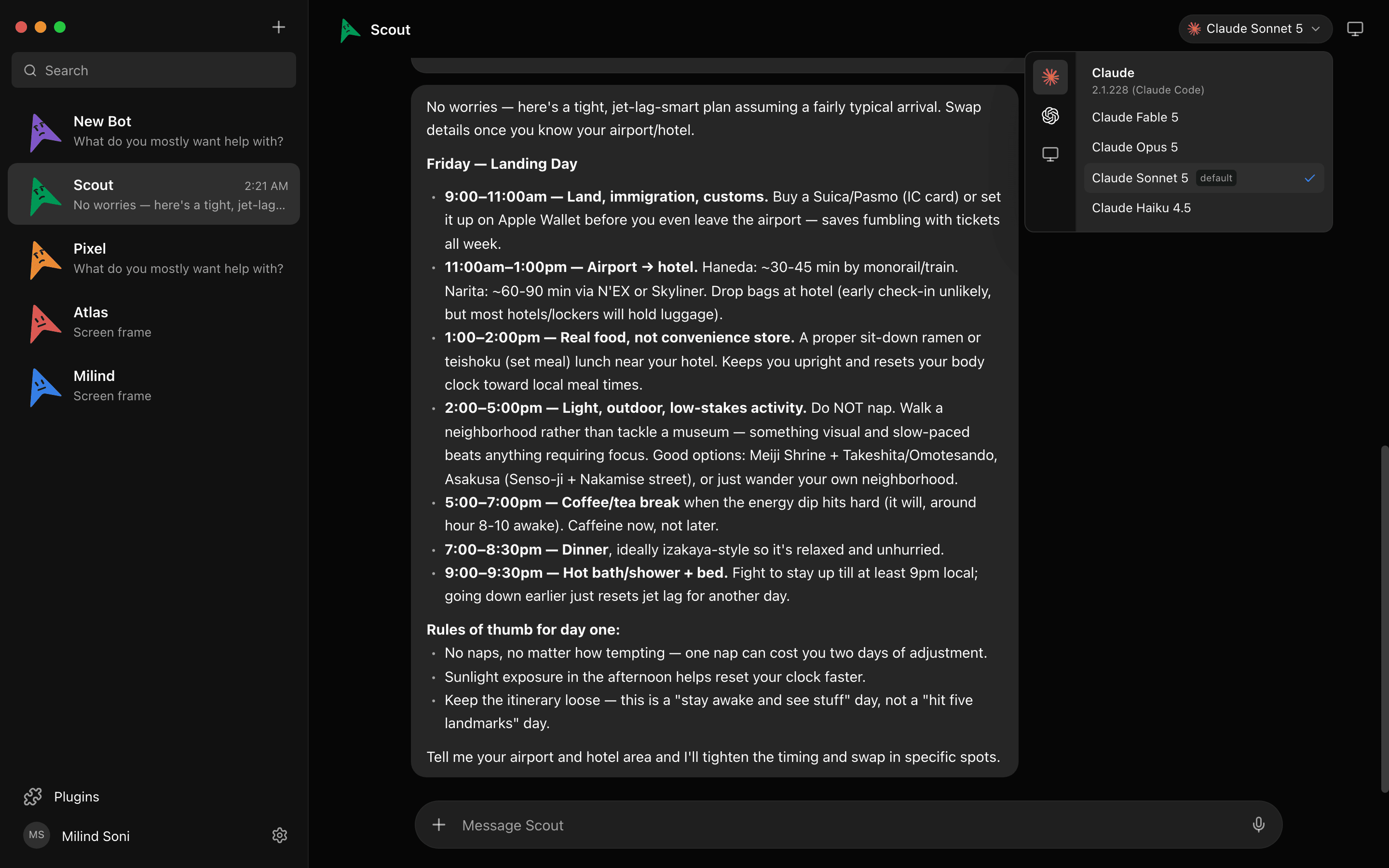
Here is a live simulation of four bots working in parallel:
A simulation. Pick a bot, or type to it. The replies are scripted; the real thing runs on your own machine.
What OpenClaw still does better
Four things, and they matter. OpenClaw lives inside WhatsApp, Telegram, Signal, iMessage, and the rest of its 29 channels; MausBot bots live in MausBot's own desktop and phone apps, not in your existing messaging apps. OpenClaw has ClawHub, a skill catalogue MausBot has no equivalent of. OpenClaw has about 394,000 stars and a far larger contributor base behind it, while MausBot is a young project whose first commit was in August 2026. And OpenClaw runs on Windows on ARM64; MausBot's Windows build is x64 only. If channel reach or skill count is the job, OpenClaw wins today.
Other OpenClaw alternatives
- Hermes Agent from Nous Research is the closest thing to OpenClaw in scope: MIT, Python, about 263,000 stars since its February 2026 launch, 20+ chat gateways, cron, subagents, and skills it creates from experience. By default a helper model judges risky commands, and it has a desktop app. Several agents means several profiles, each kept apart. Hermes is also one of MausBot's 16 engines, so you can run it as a bot.
- ZeroClaw is a single Rust binary with 30+ channels, a supervised default, and sandboxes, at about 33,000 stars. The right pick if you want OpenClaw's shape with a smaller footprint and a safer default, and you are happy in a terminal.
- NanoClaw runs each agent in its own Linux container on the Claude Agent SDK, with Codex, OpenCode, Cursor, and local Ollama models as add-on providers; about 31,000 stars, on macOS and Linux, Windows through WSL2. Isolation is the safety story rather than approval prompts.
- Goose, started at Block and now part of the Agentic AI Foundation at the Linux Foundation, is Apache 2.0 with about 57,000 stars, a desktop app and a CLI, approval modes (autonomous by default), MCP extensions, and 15+ model providers. Closer to a coding and task agent than a chat bot, and a solid choice if you want a GUI with a foundation behind it.
- Claude Cowork from Anthropic is closed source, runs Claude models only, and comes with every paid Claude plan. It merged into the single Claude experience on September 16, 2026. Polished, but no local models. We wrote up the open-source options separately.
- Grok Bot from xAI is a roster of named bots in a messaging app, at version 1.0 since November 2, 2026 after a beta from August 11. One shared cloud computer per account, the model picked for you per task, and included from The X Subscription's $30 Premium plan, or with a linked SuperGrok or paid Cursor plan. See Grok Bot vs MausBot.
OpenClaw vs Hermes vs ZeroClaw vs MausBot
Stars and defaults were checked on November 15, 2026, against each project's own GitHub page and docs.
| OpenClaw | Hermes Agent | ZeroClaw | MausBot | |
|---|---|---|---|---|
| License, stars | MIT, ~394k | MIT, ~263k | MIT or Apache 2.0, ~33k | Apache 2.0, apart from an enterprise/ folder |
| Interface | Native desktop apps for macOS, Windows and Linux, iOS and Android apps, a browser Control UI, a CLI | CLI, plus Hermes Desktop, released as a public preview in June 2026 | A single Rust binary, a web dashboard, and its chat channels | A desktop chat app plus iPhone and Android apps. Every contact in the sidebar is a bot. |
| Default before running a shell command | Runs it. Exec mode defaults to full on gateway hosts; ask mode must be switched on. | Smart: a helper model approves low-risk commands, denies dangerous ones, and asks you about the rest | Supervised: medium-risk actions need approval, high-risk ones are blocked | Runs it. Full access by default; Ask for approval, Auto-accept edits or Approve for me per bot or thread |
| Chat channels | 29, WhatsApp, Telegram, Discord, Slack, Signal and iMessage among them | 20+ chat gateways | 30+ channels | None. You talk to bots in MausBot's desktop, iPhone and Android apps. |
| Models | OpenAI (API or ChatGPT sign-in), Anthropic (API or Claude CLI), Google, xAI, DeepSeek and more; Ollama and other local models | Nous Portal, OpenRouter, OpenAI, Anthropic, xAI, Gemini and more; local servers | Anthropic, OpenAI, Ollama and about 20 more | 16 agent engines (Claude Code, Codex, Grok, Cursor, Copilot, Hermes and more), API and local models; chosen per bot |
| Platforms | macOS, Windows (x64 and ARM64), Linux; iOS and Android apps | Linux, macOS, native Windows, WSL2; Android through Termux | macOS, Windows, Linux; FreeBSD and embedded boards per its docs | macOS (Apple silicon and Intel), Windows x64, Ubuntu; iPhone and Android apps |
Which one should you choose?
Stay on OpenClaw if you need your agent inside WhatsApp or Signal, you want the biggest skill catalogue, and you are the kind of person who will set exec mode to ask, keep the gateway off the public internet, and read the release notes.
Choose Hermes if you want OpenClaw's reach with a smart command check on by default and you like Python.
Choose ZeroClaw or NanoClaw if you want a smaller, sandboxed footprint and a terminal is home.
Choose MausBot if you want a desktop app on Mac, Windows, or Ubuntu with iPhone and Android apps, a team of bots that each run their own engine (Claude Code, Codex, Grok, Hermes, or OpenClaw itself), approvals you set per bot, apps you sign in to once, and the Claude, ChatGPT, or Grok plan you already pay for doing the work. It is the easier starting point for someone who does not want to run a server.
Frequently asked questions
- Is OpenClaw safe?
- It can be, if you run it carefully. The record shows many people did not. CVE-2026-25253 allowed one-click remote code execution until it was fixed on January 30, 2026, and Hunt.io counted more than 17,500 exposed instances at the time. In February 2026 scans found more than 135,000 exposed instances, then more than 312,000 hosts on port 18789. OpenClaw's security docs now say a regular host install binds the gateway to loopback. The v2.0 release in August tied approvals to each request, but The Register noted that secrets still sit unencrypted at rest and the sandbox is not enabled automatically.
- Does OpenClaw ask before running commands?
- Only if you configure it to. OpenClaw has exec approvals with deny, allowlist, ask, auto, and full modes, but the default on gateway hosts is full, which runs commands without a prompt. The docs also say approvals are not a per-user auth boundary. MausBot also starts every bot at Full access, so neither asks out of the box. In MausBot you switch a bot or a single thread to Ask for approval, Auto-accept edits, or Approve for me, and a bot's sends on your behalf can be set to ask every time.
- Can I use my ChatGPT or Claude subscription with the alternatives?
- With most of them. OpenClaw signs in with a ChatGPT subscription through its OpenAI provider and reaches Anthropic through the API or the Claude CLI. Hermes uses ChatGPT through Codex sign-in; for Claude its docs say only Max with extra usage works, and Pro subscribers need an API key. MausBot runs Claude Code and Codex themselves, installs and signs them in from inside the app, and uses the plan or API key you already have.
- Which OpenClaw alternative works on Windows?
- OpenClaw itself has a native Windows app, Windows Hub, for x64 and ARM64, a PowerShell installer for the CLI and gateway, and WSL2, which its docs call the most Linux-compatible gateway runtime. Hermes runs natively on Windows 10 and 11, which its README calls fully supported, and Hermes Desktop has a Windows build. MausBot ships a Windows x64 installer, not yet code-signed.
- Is there an OpenClaw alternative with a GUI?
- Yes, and OpenClaw now has one too: native desktop apps for macOS, Windows, and Linux, plus phone apps. Hermes Desktop was released as a public preview in June 2026. Goose, which started at Block, ships a desktop app alongside its CLI. MausBot is a desktop app first, with iPhone and Android apps, and it installs and signs in Claude Code or Codex for you.
Get started in two minutes
Download for macOS, Windows, or Ubuntu, let MausBot install and sign in Claude Code or Codex, and meet your first bot. The iPhone and Android apps are shared in our Discord. Or read the source on GitHub first. The app is free and you pay your model providers, not us; a Cloud plan from $19 a month is optional, for bots that keep working with your laptop closed.
This post is based on the products as they were on . Products change. If something here is out of date, tell us and we will correct it.