· Updated · 6 min read · Omkar Satpute and Milind Soni
How to run Claude Code and Codex side by side
Both agent CLIs want the whole terminal. Here is how to run Claude Code and Codex at once, in one window, with a model per task instead of one for everything.
Claude Code and Codex both assume they own the terminal, which is why running them together is awkward. MausBot fixes it by treating each CLI as a bot in a chat app: one local harness spawns both, normalizes their protocols into a single event stream, and lets you assign a model per bot instead of picking one for everything. It is free, Apache 2.0 licensed, and runs on the subscriptions you already have.
Why this is annoying today
If you pay for both Claude and Codex, you have probably noticed that using both is a chore. Each CLI is built as a full-screen, one-at-a-time session. Running two means two terminal tabs, two sets of context you hold in your head, and no built-in way for one to hand work to the other short of wiring it in as an MCP server.
So most people quietly pick a favorite and let the other subscription idle, even though the models are genuinely good at different things. Claude and Codex do not fail in the same places, and the practical value of holding both only shows up when you can put them on different jobs at the same time.
The approach: one bot per model
The fix is to stop treating an agent as a session you enter and start treating it as a contact you message. Each bot owns its own thread, its own model, and its own working context. You talk to whichever one the task suits, and they keep running when you switch away.
Underneath, a single harness on 127.0.0.1 owns every agent process. It spawns the CLIs already installed on your machine, and normalizes each provider's native protocol into one event stream, so the same cards, the same transcript format, and the same controls work no matter which model is behind a given bot.
Setting it up
1. Install the CLIs you want
When this post first ran, bots ran on claude, codex, and grok. Today MausBot supports 16 agent engines, plus API and local models, and it installs Claude Code or Codex for you and signs them in from inside the app. If a CLI already works in your terminal, it will work here, because MausBot uses the same binaries and the same logins.
2. Install MausBot
Download the app for macOS, Windows, or Ubuntu. The harness ships inside it, so there is no separate server, daemon, or Docker step to run yourself.
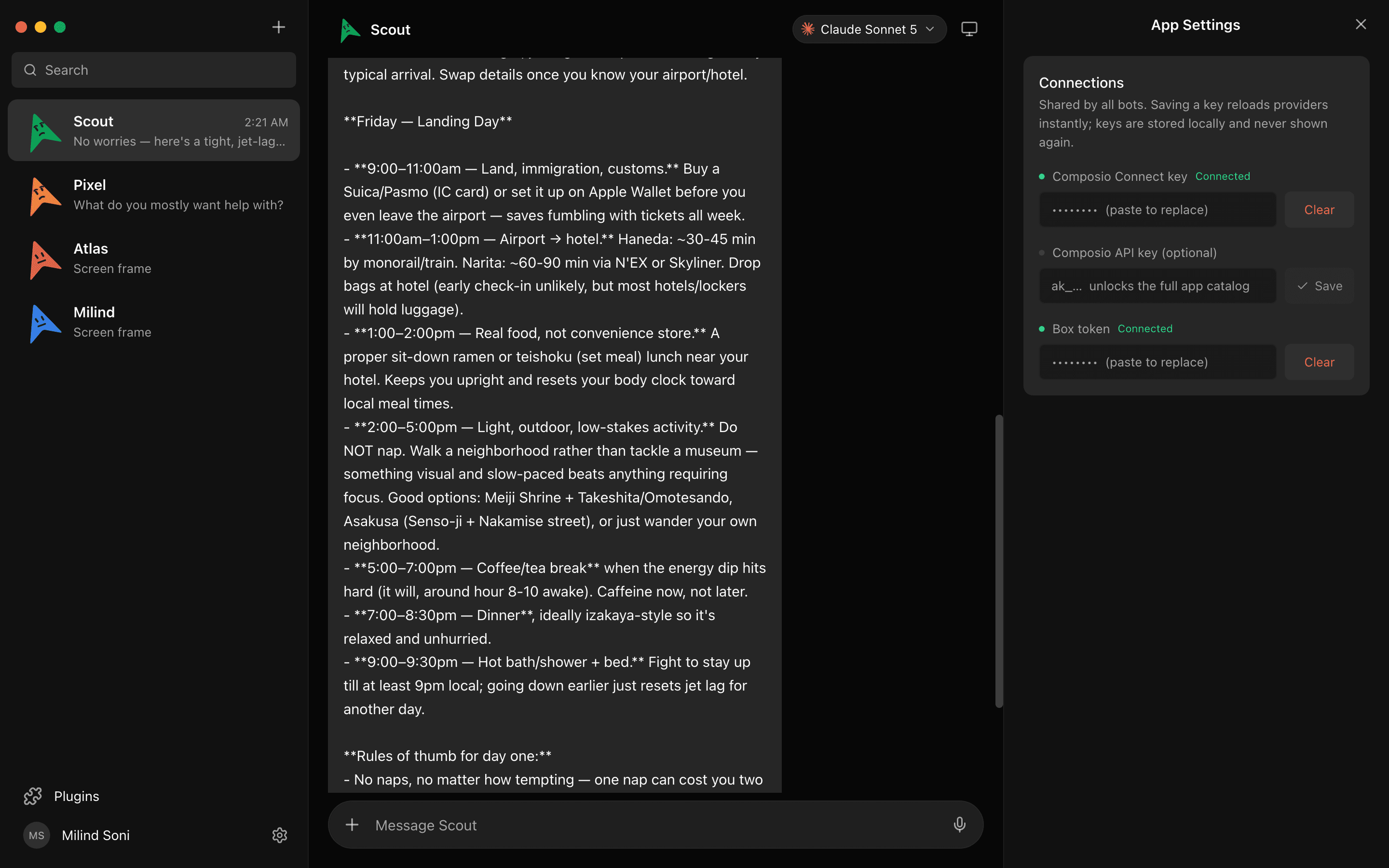
3. Paste keys once, if you use them
If you would rather drive a provider with an API key than a CLI login, paste it in settings and the provider fleet hot-reloads, with no restart. Secrets are write-only, so the interface never reads them back after you save them.
4. Give each bot a brain
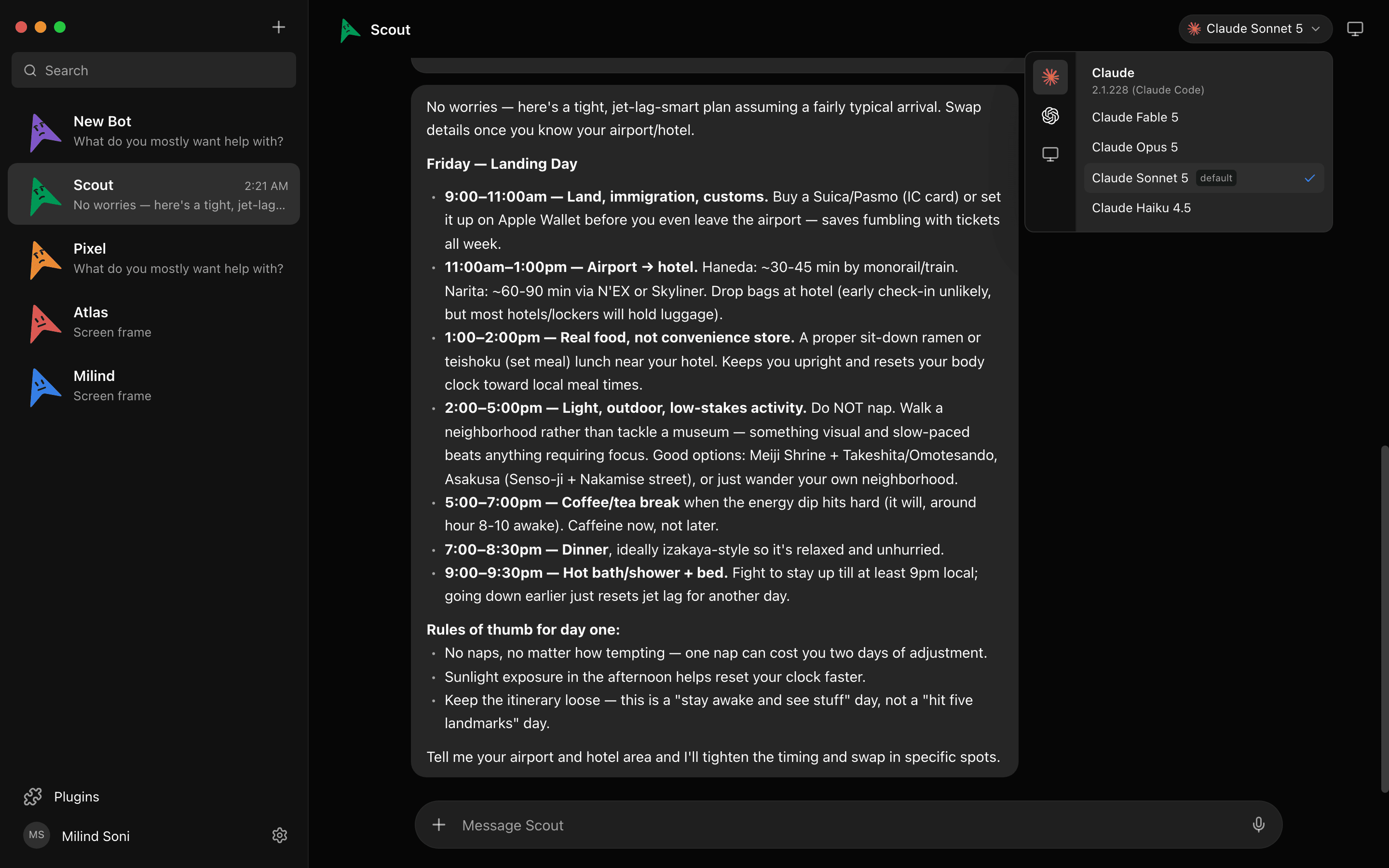
Open the model picker on a bot and choose. Claude and Codex models sit side by side in a provider rail, so the choice is one click rather than a config file. You can switch a bot's model mid-conversation without starting the thread over.
How to actually divide the work
Having both available only pays off if you give them different jobs. Patterns that hold up:
- One bot per repository. The simplest split, and the one least likely to have two agents editing the same file. Each bot keeps its own context on its own codebase.
- One bot per stage. One drafts, another reviews. Two models disagreeing about the same diff is more useful than one model agreeing with itself.
- One bot per surface. A code bot on Codex, a writing-and-research bot on Claude, an ops bot wired to Slack and Linear through connected apps.
- A long-running bot and a fast one. Give the slow migration its own thread and stop letting it block the two-minute question you actually need answered.
Getting them to work together
Once each bot is a contact, putting them in a room together is the obvious next step. In a group chat, one bot answers by default, or everyone does, or only the ones you @mention. Bots can ask each other questions and hand off work, and a bot set up as Chief of Staff can hand out the work for you.
That is where running two models stops being a filing convenience and starts being useful: a Codex bot writes the patch, a Claude bot reads it, and you arbitrate.
Keeping control of what they run
Two agents with shell access is exactly twice the reason to think about approvals. When this post first ran, every shell command and file edit surfaced as a card to allow or deny. Since October 14, 2026, every new bot starts at Full access, where the engine runs in its most permissive mode and only real questions and missing sign-ins reach you. Set a bot to Ask for approval, Auto-accept edits, or Approve for me, and what the engine leaves for you arrives as a card in the chat. Questions always do. A separate Sending on your behalf setting decides whether a bot asks every time before it sends email, messages, posts, or payments. The behavior is identical whether the bot is working on a cloud computer or on your own machine.
Transcripts, keys, and events stay in ~/.openmausbot on your own disk. Prompts go only to the model provider each bot uses.
Frequently asked questions
- Do I need both subscriptions?
- No. Any one engine is enough to start: Claude Code, Codex, Grok, or another of the 16 agent engines, or an API or local model. Providers you have not configured are shown dimmed, with the reason, rather than hidden.
- Does this proxy my requests through your servers?
- No. The harness runs on
127.0.0.1and spawns the CLIs installed on your machine. Requests go from those CLIs to your providers, exactly as they would in a terminal. There is no server in the middle. The optional paid Cloud plans run the same harness on a cloud machine of your own instead of your laptop. - Does it use my subscription or an API key?
- Whichever the CLI itself uses. If you are logged into claude or codex with a subscription, the bots inherit that login. If you would rather use API keys, paste them in settings and the provider fleet hot-reloads.
- Can two bots work on the same repository at once?
- Yes, and it is worth thinking about before you do. Two agents editing the same files at the same time collide the same way two people would. Give them separate areas, or separate checkouts, and if you want to see each write before it happens, set those bots to Ask for approval.
- Is it free?
- The app is. MausBot is Apache 2.0 licensed, apart from an enterprise/ folder, and the desktop app costs nothing. Optional Cloud plans, from $19 a month, keep bots running with your laptop closed. You keep paying your model providers directly, at what you already pay them.
Get started
Download MausBot, point it at the CLIs you already have or let it install Claude Code or Codex, and give two bots two different models. If you want the wider picture first, read the introduction to MausBot or the Grok Bot comparison. The source is on GitHub under Apache 2.0.
This post is based on the products as they were on . Products change. If something here is out of date, tell us and we will correct it.